SESSION LIVE --:--:-- GET THE EA — FREE
MT5 Gold EA · XAUUSD · MetaTrader 5 · 100% free

MT5 Gold EA — the gold engine
that trades while you don't have to.

MT5 Gold EA runs an automated straddle-and-recovery strategy on gold, wrapped in an always-on risk core. The software is completely free — you only fund your own trading account. Watch it run live, right below.

0EQUITY GUARD
0SAFEGUARDS
MT5HEDGING ACCOUNTS
$0SOFTWARE COST
LIVE FLEET see the live fleet →

↓  See exactly how the engine trades · live simulation  ↓

WATCHLISTXAU
ACCOUNT#87231·hedging
Balance100,000.00
Equity100,000.00
Today P/L+0.00
Peak equity100,000.00
XAUUSD · M5 · MT5 GOLD EA4032.00
strat straddle + grid · D 3.0 · step 1.5 · TP 2.4
FLAT — WAITING
MT5 GOLD EA
Side
Grid levels0 / 7
Avg / breakeven
Basket TP
Floating P/L$0.00
Market filterrange OK
Newsclear
LIVE — READY
RISK CORE
Equity guardarmed · 30%
Daily target$900.00
Rolloverclear · 23:00
Basket capwatchdog on
EXPERT LOGtail -f experts.log
goldea>

goldea> verified --live

That was a simulation.
This is a real account.

The terminal above is an illustrative demo of the logic. Below are two real MT5 accounts of ours — one cent, one standard — running the engine, tracked independently by FXBlue. Read-only data we cannot edit. The cent one is the account type you run yourself; the standard one is published as evidence for the standard accounts the hosted programme runs on — it isn't an invitation to open a standard account and run it yourself, because the EA is licensed and supported for cent accounts and standard accounts are covered by the hosted programme instead. And it's not just our own accounts: the live fleet combines the client accounts taking part into one equal-weighted index, updated continuously, with the best, median and worst account published beside it.

VERIFIED BY FXBLUE
Cent account USCfull stats →
Standard account USD · standard tierfull stats →

Real trading account · results vary and past performance is not indicative of future results. See the Risk Disclosure.

Available with leading partner brokers

Vantage
IC Markets
RoboForex
PlexyTradeUS · hosted route

goldea> why --free

Wait — it's really free?

Yes. No licence fee, no catch. Here's exactly how it works — so you can see why our interests are lined up with yours.

You open an account via our link

With one of our partner brokers, on MetaTrader 5, funded to the minimum for your account type.

The broker shares a commission with us

When you trade, the broker pays us a small introducing-broker commission. You are never charged anything extra for it.

So the EA stays free — and we both win

We only do well if your account survives, so we're motivated to give you a tool with real risk controls — not one that chases a big month and blows up.

goldea> modules --list

The engine, module by module.

A complete trading core — entry, recovery, and capital protection — engineered to run as one on a single symbol it knows deeply.

ENTRY.straddle

Straddle entry

Catches the move either way. Paired BuyStop / SellStop bracket the market; whichever fills first wins the cycle and the opposite pending is cancelled instantly.

RECOVERY.grid

Adaptive grid

Recovers instead of panicking. Measured grid levels are added at tuned spacing when price moves against the side, with a weighted-average take-profit recomputed on every entry.

RISK.killswitch

Equity kill-switch

Protects the account first. An always-active drawdown guard — live even in pause windows — flattens everything the instant risk crosses your limit.

FILTER.regime

Market regime filter

Stays out of bad conditions. Optional ADX, MA-slope, ATR-band and breakout detection block new cycles in trending or violent markets.

SAFETY.basket

Basket guards

Caps the downside. Per-side limits on total lots and floating drawdown, plus a count-drop watchdog that flattens a basket if exits fire unexpectedly.

TIME.rollover

Rollover protection

Sidesteps thin spreads. A configurable pause window pulls pending orders around daily rollover while open baskets keep broker-side protection active.

goldea> risk --core

14 built-in safeguards

Capital protection comes first.

Most EAs bolt risk on as an afterthought. MT5 Gold EA is built risk-first — every cycle runs inside layers of independent safeguards that stop a bad day from becoming a bad account. The grid is capped and supervised, never open-ended. Sceptical about grids? Read our honest take on grid-trading risk.

drawdown.killswitch

Equity kill-switch

Your hard floor. Tracks peak equity and flattens every position and pending the instant drawdown crosses your limit — active even during rollover pauses.

basket.caps

Basket caps

Exposure can't snowball. Hard ceilings on grid levels, total lots, and floating loss per side — the grid is capped, never unlimited.

filter.news

News & event filter

Steps aside for the spikes. A live economic-news feed from our own server lets the EA pause new trades around high-impact releases — when gold moves fastest and grids are most at risk.

The full protection stack

Equity kill-switch Grid-level cap Total-lot cap Basket drawdown cap Minimum-balance gate Market-regime filter News & event filter Per-ticket basket cycle guard Spread guard Volatility circuit breaker Friday & weekend wind-down Rollover pause Daily-target lock Account & symbol validation

goldea> news --filter
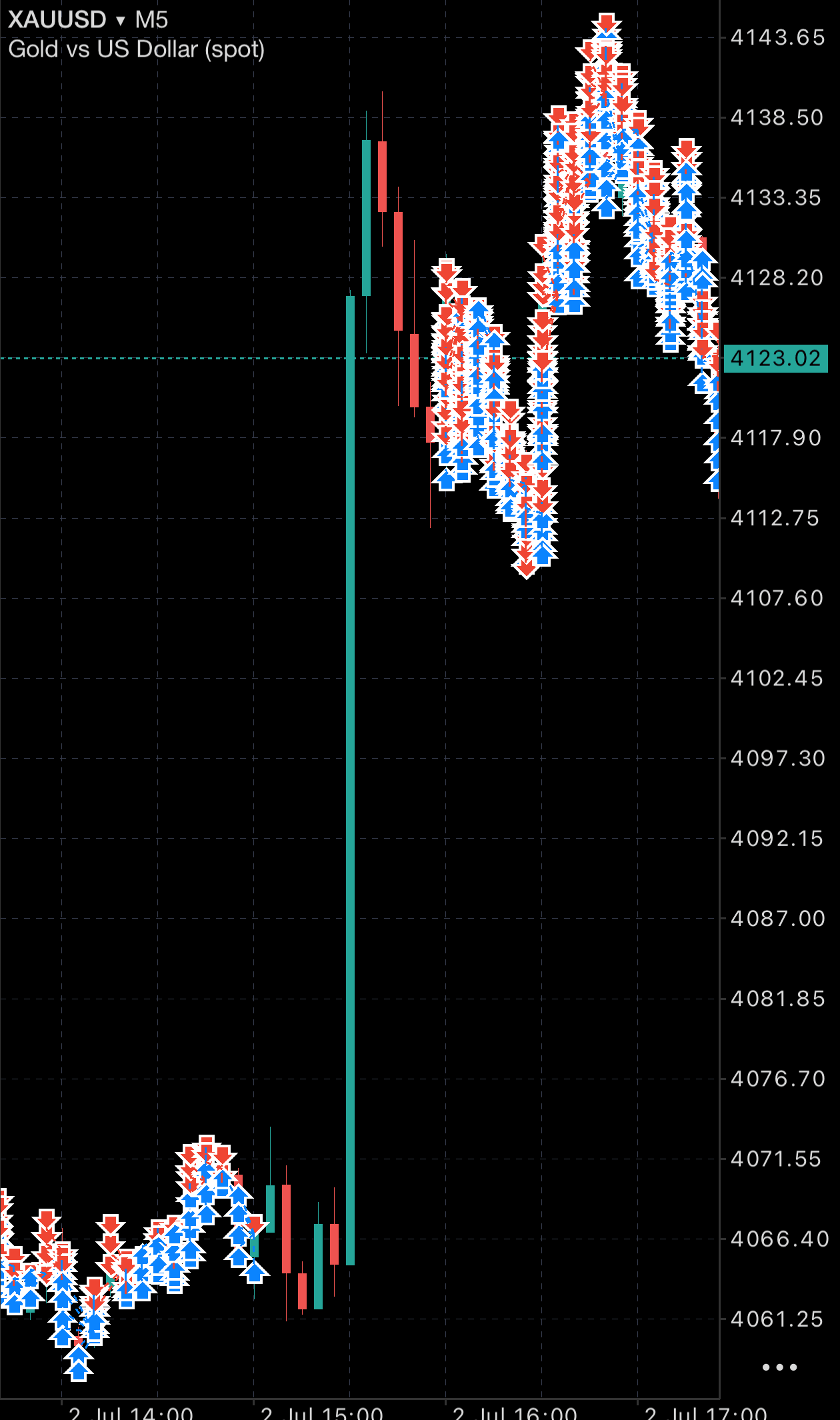
MT5 mobile · XAUUSD M5real chart
MT5 mobile XAUUSD M5 chart — the news filter pausing new trades through a high-impact gold price spike
⚡ News spike — no new trades opened

The news filter, caught in the act.

This is a real MT5 chart. Look at the dense trade markers before and after — then the clean gap straight through the violent gold spike. That's the server-driven news filter stepping aside around a high-impact release, exactly when grids get into trouble.

  • Before & after: the engine trading normally in calm conditions.
  • Through the spike: no new trades opened — it stood down.
  • Then it resumes once the market settles.

One real example, captured on MT5 mobile. Illustrative of the safeguard's behaviour — not a performance claim.

goldea> environment --vps

The environment is the edge.

This engine manages a live grid tick by tick. A dropped connection, a latency spike, or a sleeping home PC can mean a missed grid entry, a missed basket close, or a stuck recovery. Run it on a low-latency VPS beside your broker and it works around the clock exactly as designed. With this setup the environment matters more than the strategy — the strategy only performs when it never misses a tick.

uptime.247

Always on

Never misses a tick. The EA must run continuously to manage open baskets — a VPS keeps it live 24/5 with no closed laptop, no forced update, no power cut.

latency.low

Low latency

Tighter fills. Hosted next to your broker's servers, orders reach the market in milliseconds — less slippage on entries and basket exits.

stability.clean

Stable & isolated

No home-PC risk. A dedicated, stable connection removes the internet, power and machine failures the EA cannot control.

ForexVPS.netrecommended VPS partner

Purpose-built, low-latency MetaTrader hosting with locations beside major brokers — the environment we recommend for running MT5 Gold EA reliably.

Get your VPS →

A stable VPS is strongly recommended. You remain responsible for your operating environment — see the Risk Disclosure.

goldea> monitor --telegram

LIVE · FREE FOR EVERY LICENSE

We watch your EA, so you don't have to.

A VPS can reboot. A terminal can close. Most traders find out days later — with open baskets left unmanaged. Not here: our servers monitor every licensed EA around the clock and message you on Telegram the moment yours goes quiet.

watch.heartbeat

Down-alerts in minutes

Know before it costs you. The EA reports to our servers every few minutes. If it stops — VPS crash, closed terminal, power cut — you get a Telegram message within about 15 minutes, and another the moment it's back online.

bot.status

/status — anytime

Your account in your pocket. Message @MT5GoldEABOT with /status and get your latest report: equity, open positions, EA state, last contact. No login, no extra app — it works wherever Telegram works.

setup.zero

Zero setup

One message and you're covered. Send /link YOUR-LICENSE-KEY to the bot, done. No VPS changes, no configuration — monitoring rides on the secure connection the EA already uses. Full instructions →

Monitoring is a free service on top of the EA (v1.34 or newer). It alerts you — it doesn't replace a stable VPS environment, which remains your responsibility. See how to link your Telegram.

goldea> faq

Questions, answered.

Is it really free?+
Yes. There's no licence fee. You only fund your own trading account with a partner broker. The broker pays us a commission on your trading activity — that's what keeps the software free for you.
What's the catch?+
No catch. The only requirement is that you open and fund your account through our partner link and keep it at or above the minimum balance. That registers you to the programme and keeps the EA active.
How much do I need to start?+
About USD 1,000, either way. There are two routes and no others. If you run the EA yourself, that's a cent account: MT5 Gold EA is supported on cent accounts, it checks the balance at startup and will not trade below USC 100,000 (about USD 1,000). If cent accounts aren't available where you live, as is usually the case for US and Canadian residents, the route is the hosted programme, also from USD 1,000: your own standard account at your own broker, with the terminal running on our server instead of yours, and no fee of any kind. It's by application rather than sign-up.
Does the EA scale its lot size with my equity?+
No, and that's deliberate. The starting lot is fixed at 0.01 and isn't an adjustable input — the grid spacing, multiplier, caps and kill-switch were all tested together as one configuration, so letting the lot float with equity would change the risk of every level in the grid. If you top up an account, it simply runs more conservatively than designed: more margin headroom, less activity. The intended way to put more capital to work is to run another account, each with its own licence key and each running the same tested settings — not a bigger lot on one account. Keep each account comfortably above its minimum balance, though: split too finely and a normal drawdown drops one below the gate, and the EA stops trading until you top it back up.
Do you ever touch my money?+
No. The EA runs inside your own MetaTrader 5, on your own account. We never have access to your funds, deposits, or withdrawals — only an activation flag tied to your account number. On the hosted programme the terminal runs on our server rather than yours, but the account still stays in your name at your own broker, and we still cannot move money out of it — brokers pay out only to the account holder's own verified method.
Isn't grid trading dangerous?+
It's a fair concern — most grid EAs blow up accounts because they add positions endlessly, with no cap, no equity stop, and too little capital. MT5 Gold EA is engineered to remove exactly those failure modes: a hard cap on grid levels, an always-on equity kill-switch that flattens everything past your drawdown limit, per-basket lot and loss caps, a required minimum balance so the grid has room to work, an optional market-regime filter and a server-driven news/event filter that step aside in violent conditions and around high-impact releases, a volatility circuit breaker that pauses new trades during sudden price waterfalls, and a per-ticket basket guard that cleans up if exits misfire. In short: the grid is capped and supervised, not open-ended. It still carries real risk — these controls limit the downside, they don't remove it. See the Risk Disclosure.
What returns can I expect?+
We don't promise returns — anyone who does is misleading you. Trading carries a real risk of loss. What we focus on is disciplined execution and an always-on risk core. Please read the Risk Disclosure.
Which broker and platform?+
MetaTrader 5 only (not MT4), on a hedging account with high leverage (1:2000 on the cent accounts the EA is supported on) and a non-commission account type. For the cent account you run yourself, that's Vantage or RoboForex. If you can't open a cent account, which is usually the case for US and Canadian residents, the route is our hosted programme instead: your own standard account at Vantage, IC Markets, RoboForex or PlexyTrade, with the terminal running on our server. It's by application, and there's no fee of any kind.
Do I need a VPS?+
Strongly recommended. The EA must run 24/5 to manage open baskets, so it needs a stable, low-latency environment — not a home PC that can sleep, update, or lose power/internet. We recommend ForexVPS.net; with this engine the environment matters as much as the strategy.
What if my VPS or terminal goes down?+
You'll know within minutes, not days. With the free monitoring service included with every license, our servers watch your EA around the clock and message you on Telegram if it stops reporting, and again the moment it's back online. You can also request a live /status snapshot of your account anytime — see how to link your Telegram. It alerts you, though — it doesn't replace a stable VPS, which stays your first line of defense.
How long does activation take?+
Usually within 24 hours. Once we've verified your account is under the programme and funded, you'll get an email with your licence key, the download link, and the 5-minute setup guide. If you haven't heard back after a day, check spam or email info@mt5goldea.com.

goldea> access --free

The engine is free. You bring a funded account.

No license fee, ever. Open a MetaTrader 5 (MT5) trading account with our partner broker through our partner link, fund it to the minimum for your route, and we activate the engine on your account number. The EA runs on MT5 only — not MT4. There are two routes, both starting around USD 1,000: a cent account you run yourself, or — if cent accounts aren't available where you live — the hosted programme, where we run the terminal for you.

01

Choose your route & open the account

Pick Cent or Hosted below — the broker list and minimum update to match. On the cent route, open the account yourself through one of those partner links so it's registered to the programme: a MetaTrader 5 (MT5) account (the EA doesn't work on MT4), 1:2000 leverage, non-commission. On the hosted route we go through the account details with you when you apply.

02

Fund the minimum

Fund your cent account to its minimum (shown below). The engine needs this to manage the grid safely.

03

Set up your VPS recommended

Run the EA on a low-latency VPS so it stays live 24/5 and never misses a tick. We recommend ForexVPS.net — see why the environment matters. On the hosted programme you don't need one: the terminal runs on our server.

04

Receive your key & the EA

Hit the button on the right and complete the 5-minute onboarding. We verify and activate your account — usually within 24 hours — then email your license key and the MT5 download link, plus a 5-minute setup guide. Free for as long as the account stays funded and active. On the hosted programme there's no key and nothing to install — once your application is approved we set the terminal up and you watch it trade in your own account.

Your route at a glance
Account currencyUSC (cents)
Minimum balanceUSC 100,000
Real-money value≈ USD 1,000
PlatformMetaTrader 5 only
Leverage1:2000
Account typeNon-commission
USD
Enter your deposit in USD to check eligibility.
Important: MT5 Gold EA is supported on cent accounts. It checks the balance at startup and will not trade below USC 100,000 (about USD 1,000) — that gate is compiled into the EA. Keep the account funded at or above the minimum at all times: your license stays valid, but trading pauses automatically if you drop below it. If you opened a standard account rather than a cent account, that's the problem — email info@mt5goldea.com and we'll sort out the right route for you, which may be the hosted programme.
GET STARTEDfree

Activation now runs through our 5-minute onboarding. It makes sure your account is correctly connected to the programme from the very first step — that's the one thing that keeps the EA free — and routes you right even if you already have a broker account.

Start onboarding — get the EA →

We verify your account and email your license key + MT5 download link — usually within 24 hours. No payment is taken, ever. Note: the EA will not trade if the balance is below the minimum for your account type.

Can't open a cent account where you live? Then this isn't your route — the hosted programme is, and it's by application rather than sign-up.

Get the EA — free →